








In 2026, dozens of payment solutions for e-commerce platforms are in operation that respond to the common search query “How to accept crypto on a website.” A large number of companies offer services for payment processing and tracking, as well as plugins for integrating their solutions. This topic is gaining popularity because business owners—whether running an online store or an offline business—strive to keep up with the times and begin looking for ways to accept crypto payments. This not only diversifies payment methods but can also, to some extent, reduce transaction costs.
Every new field brings with it many new terms and definitions that require clarification. For example, if you are not new to the crypto space, you have likely often heard about non-custodial wallets, custodial services, and various technical solutions that supposedly ensure security and reliability. But do you clearly understand what these terms mean and how they affect the simple task you are facing—starting to accept cryptocurrency payments on your website?
What are crypto payment gateways? Essentially, these are services that track payments on-chain and notify you about the payment status. How they handle money flows is a separate question. A payment gateway may accept payments into its own accounts and grant you access to them through its interface, similar to traditional banks. At the same time, it is also possible to accept payments directly into your own wallets, and blockchain technology makes this possible.
The concept of non-custodial solutions implies that the storage of private keys and responsibility for them remains entirely with the wallet owner. In other words, only you control your funds. Based on our experience, some payment gateways manipulate this concept by providing you with private keys to wallets or accounts created within their service. In such cases, however, you are not—at least not exclusively—the sole owner of access. This can be compared to a bank card, which acts as a key to your bank account, while the bank still monitors you and your cash flows, can block your funds, request documents, and restrict your access.
In this article, we will explain the different types of cryptocurrency payment gateways—custodial and non-custodial—as well as the ability to receive payments directly into your own wallet using ready-made payment solutions for OpenCart, plugins for WordPress, and payment gateway APIs. These allow you to build your own solutions for tracking payments, their statuses, and many other tasks. We will also attempt to create an evaluation-based ranking of such gateways in terms of ease of use, security, KYC and AML requirements, cost of use, and the availability of different blockchains. This will help you understand which payment gateways are easy to use, which are more secure, how they work, and how to start accepting crypto payments in general.
Many gateways call themselves non-custodial, but in practice they still:
Control your wallets:
You receive money into your account in the system, or the system gives you private keys to access your wallet. In the second case, the crypto payment processor still has access to your money. Therefore, it cannot be said that the funds are completely under your control. The main key feature that speaks to access to funds is the ability of the service to write off transaction fees in real time or the functionality to automate crypto-to-fiat conversions or swaps into stablecoins to avoid the volatility of digital assets.
Route money through their own infrastructure:
Exchange tokens at internal exchange rates within the system, chargebacks, and the use of smart contracts that you do not control. Additional fees are charged for services within the system.
Apply KYC / AML checks:
KYC and AML are only carried out by services that can influence you by imposing restrictions on your activities. Ask yourself why a service would carry out KYC and AML if it supposedly cannot influence you. The most a non-custodial gateway can do is refuse to serve you. But you will not lose your money.
Redirect your customers to external payment pages:
Only true non-custodial solutions do not redirect your users to their payment pages. This compromises your control over your users’ checkout experience.
This article explains:
- The real difference between custodial and non-custodial gateways
- Positive and not-so-positive aspects, KYC/AML behavior, APIs, plugins, and UX issues of major services
- Why many “non-custodial” claims are only marketing
- How true P2P non-custodial payments work in practice
Custodial vs. Non-Custodial Crypto Payment Gateways
Custodial Payment Gateways
Custodial gateways take control of your money flows during the payment process.
How this works in practice:
- Your user payments go to wallets or accounts controlled by the gateway
- Funds may be stored, converted, or aggregated
- You, as a merchant, receive payouts later, usually by request
Because these gateways touch your funds, they usually enforce:
- Merchant KYC / KYB
- AML and transaction screening
- Account freezes or payment holds when transactions are flagged
This model applies to all white-label payment gateways, not only those that work with fiat transfers but also crypto transactions. This is because they are subject to licensing and supervision as CASPs or VASPs.
Main problems:
- Funds can be blocked or delayed
- Refunds often require customer KYC
- Often higher fees and conversion costs for fiat-crypto swaps
- Lower checkout rates due to regulatory compliance issues, such as additional actions required from your customers
So-Called “Non-Custodial” Gateways
Many gateways claim to be non-custodial because:
- Merchants can withdraw funds to their own wallets (by request)
- Wallet keys are “assigned” to the merchant
In reality:
- Wallets they provide are often created inside the gateway
- Your customer funds still pass through the provider’s infrastructure
- Conversions, swaps, and routing happen internally in the gateway system
This means the gateway you use still controls the payment flow and can block or restrict it. In other words, it’s not very user-friendly.
True Non-Custodial Model
A true non-custodial gateway has one key rule:
Your money never passes through the gateway.
What does it mean:
Direct payment: Payment goes directly from your customer’s wallet to the merchant’s (your) wallet that you provide. So you can use any software or wallets you want to receive Bitcoin payments or any other crypto.
Payment tracking: The gateway only tracks the transaction on-chain and notifies you about the status. Just as you would do it manually through a block explorer, the system does it automatically.
Your money, your control: The gateway never touches private keys or funds because it does not have your keys. You simply specify the wallets to which you want to receive money, and these wallets are included in your users’ invoices. This means that the payment goes directly to you. This model eliminates all risks associated with storing funds.
A Common Problem: Redirection to an External Checkout Page
Most crypto payment gateways, with a few exceptions, share one major UX issue:
they redirect buyers (your customers) to external checkout gateway pages.
This applies to:
- BitPay
- Coinbase Commerce
- NOWPayments
- CoinPayments
- BTCPay Server (default setups)
Why this is a problem:
Your user is redirected to a third-party payment page, which, in our opinion, reduces the level of trust in the payment process. Not only is the entire UX and branding controlled by the crypto payment solution, but usability can also affect sales conversion.
How much does a crypto payment gateway cost
The market value of services, regardless of the type of cryptocurrency gateway, ranges from 0.4% to 1% for receiving a transaction itself. Some gateways charge more, so just look for another gateway; this is robbery. Custodial services charge an additional percentage for services such as swaps into stablecoins or fiat for hedging against high-volume assets such as Bitcoin, Ethereum, Solana, or similar. The way commissions are charged also affects the checkout process. This is because payment gateways often add their commission on top of the cost of your goods, and you will agree that it is not very pleasant when you see one price for a product, but for some reason have to pay another amount. Our subjective opinion is that transaction costs should be hidden and paid by the business owner, even if this is included in the price of the goods, but hidden.
Which crypto payment gateway has no KYC
KYC does not have gateways that do not meet the requirements of financial regulators. The reasons may vary, from the form of service provision and the availability of a license to the country of registration. This is a very controversial issue that is constantly changing in different countries. On the one hand, KYC is a regulatory requirement in some cases (for example, for services that store your keys), but its presence can greatly affect the ease of connecting your customers to the service and cross-border payments in general, as each country has its own rules and specifics. Examples will be given below in the description of specific payment gateways.
What is the easiest crypto payments gateway
Here, we need to separate the question: what is easiest for you as the owner or for the user? In our understanding, ease means technical accessibility, so that you can use it without any special knowledge, and so that nothing gets in the way of your operational activities. For the user, this is, of course, accessibility and ease of making payments without being tied to specific programs, extensions, etc.
How secure are cryptocurrency payment gateways
If you use a custodial service, the security of your funds is entirely on the side of the payment gateway. Payment gateways can be hacked and stop working altogether. The biggest problem with custodial payment gateways is that they can simply block your money based on their rules. And they will require you to provide a lot of additional documents. Or they may block a specific payment from your customer, which will become a double problem for you in terms of customer support. With non-custodial gateways, at least the problem of blocking funds is eliminated, and even if the payment gateway is hacked, they still don’t have access to your wallets.
How does the setup of a crypto payment gateway work
It all depends on your project, on which you want to accept online payments. Most services provide ready-made integrations for popular platforms such as WordPress, Opencart, Shopify, and others. But if you have a custom project on your own engine or there is no such integration, you can always hire a programmer and use the API to implement your own solution.
Which crypto payment gateway supports the most cryptocurrencies
See the breakdown of payment gateways below. But let’s say right away that the number of cryptocurrencies is not always a good thing. The main native coins of blockchains such as SOL, ETH, and stablecoins are a given. But when there are thousands of obscure tokens with varying volatility, it not only distracts the buyer from finding the currency they need, but also creates an additional burden for you in providing the infrastructure to accept such payments in the case of a non-custodial payment gateway: wallets on different networks, bridge costs, and swaps. The custodial option is simpler, as it often includes asset auto-swap functions, but you will still incur transaction costs.
Detailed Gateway Analysis
1. Bcon
Website: https://bcon.global
Type: True non-custodial (P2P, non-hosted)
Founded: 2023
KYC: No
AML: No
Fee: 1% per transaction (paid separately, not debited directly from the transaction)
Checkout: Native on-site checkout (no redirection to any pages)
API: REST
Plugins: WordPress / WooCommerce, OpenCart, WHMCS, Shopify
Bcon Pros
- True non-custodial P2P model — payments go directly from the customer to your wallet
- No third-party custody or intermediate wallets on the way
- No KYC or AML requirements for you as a merchant or for your customers
- No hosted or external checkout pages
- Payment flow stays entirely on your website
- Very simple setup — only an email and wallet address required
- Free plugins that auto-adapt to site design
- Easy integration for custom payment flows
- Supports BTC, ETH, BNB, SOL, TRX chains
- Stablecoins: USDT, USDC, USDS, TUSD
- Actively expanding chain support based on merchant demand
Bcon Cons
- No built-in fiat conversion, swaps, or bank payouts
- Commission cannot be deducted from the transaction itself, so you need to top up the service balance separately
- You, as a merchant, must manage your own wallet and funds
- Doesn’t support fiat currencies
User Experience & Challenges
P2P Payments
Bcon operates on a true peer-to-peer (P2P) model, sending funds directly from the buyer’s wallet to the merchant’s wallet. There are no intermediate wallets or third-party custody, so payments remain fully on-site and under your control, simplifying the experience and minimizing friction.
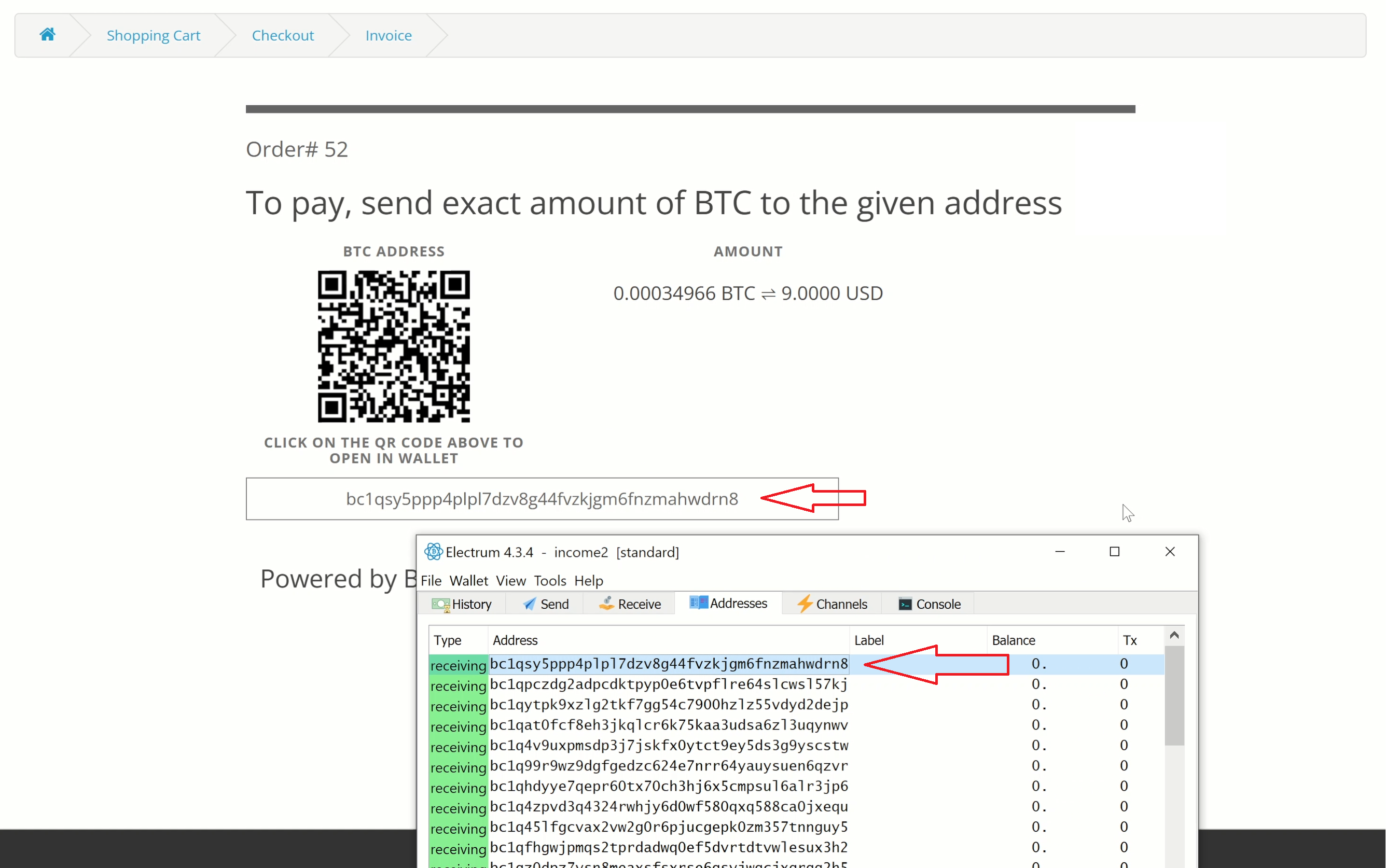
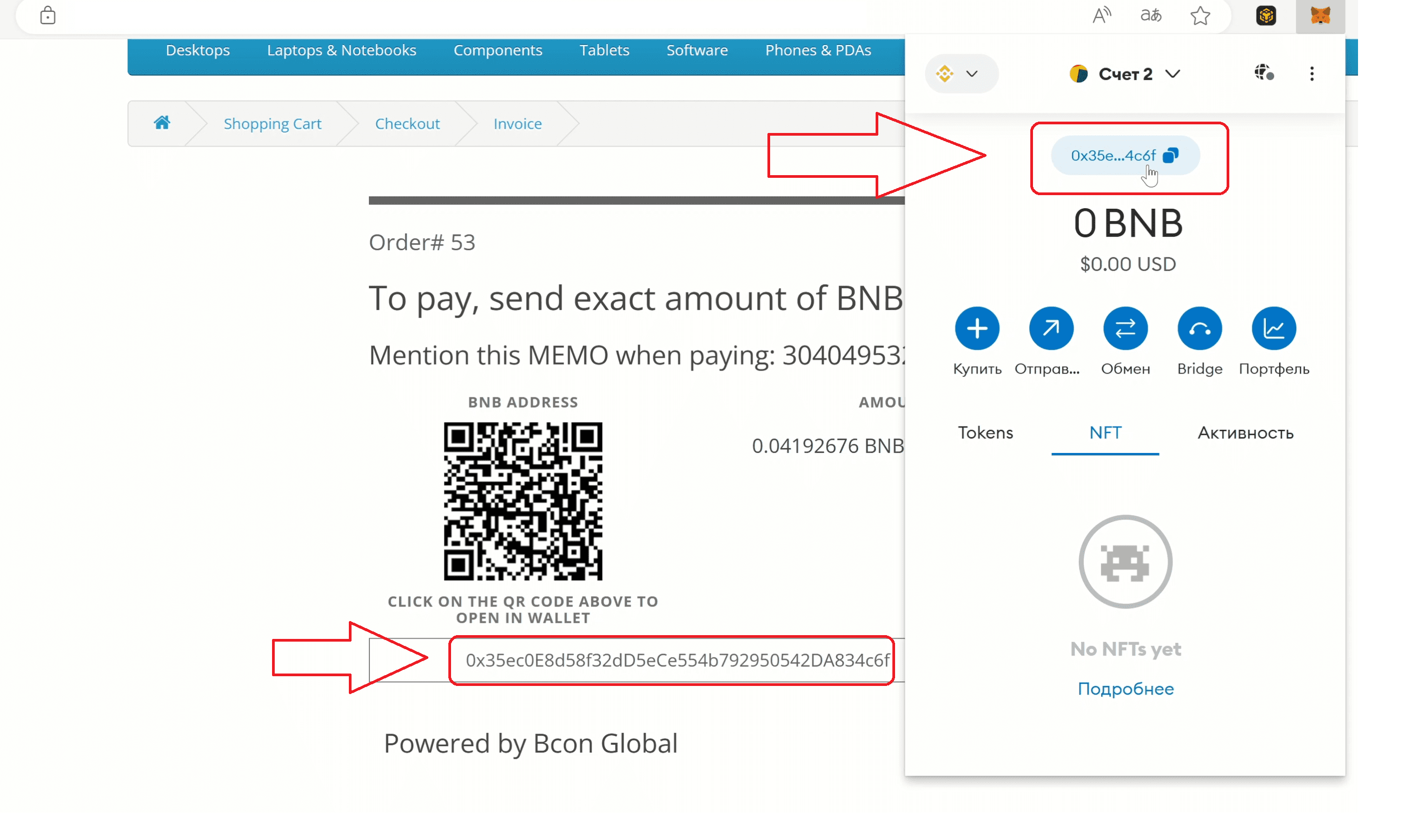
Bcon was created so that businesses, particularly eCommerce businesses, could use crypto payments as a technological advantage of blockchain technology, rather than as a new shell for traditional payments. Bcon is not so much a fintech service provider as an interface for tracking transactions and their statuses, which allows your customers to pay for your goods and services using any crypto wallet or payment option available to them that allows cryptocurrency transactions, without being tied to specific accounts, browser extensions, or platforms. And you, as the owner of an online store or other eCommerce project, receive payments directly to your wallet, without fear that your money will get stuck or blocked somewhere due to the rules or requirements of the payment gateway.
Summary
Bcon is a true non-custodial P2P crypto payment gateway designed for maximum ease of use and maximum security for your operations and your users. Bcon does not store your money, but only tracks and notifies you of payment status, does not require verification from you or your users, and cannot physically block your wallets and funds.
2. BitPay
Website: https://bitpay.com
Type: Custodial
Founded: 2011
KYC: Required for store owners, often required for store customers
AML: Yes
Fee: ~1% + conversion fees
Checkout: External BitPay-hosted pages
API: Full REST
Plugins: WooCommerce, Shopify, Magento, POS
BitPay Pros
- Long-established and widely known brand
- Supports fiat settlement to bank accounts
- Strong accounting and reporting tools
BitPay Cons
- Possible mandatory KYC/KYB for you and your customers
- Your customers may be forced into KYC for refunds
- External checkout pages reduce conversion (our personal opinion)
- Limited token support
- Funds can be delayed or frozen by the service
- Wide list of unsupported countries (you are not permitted to serve customers from this list)
User Experience & Challenges
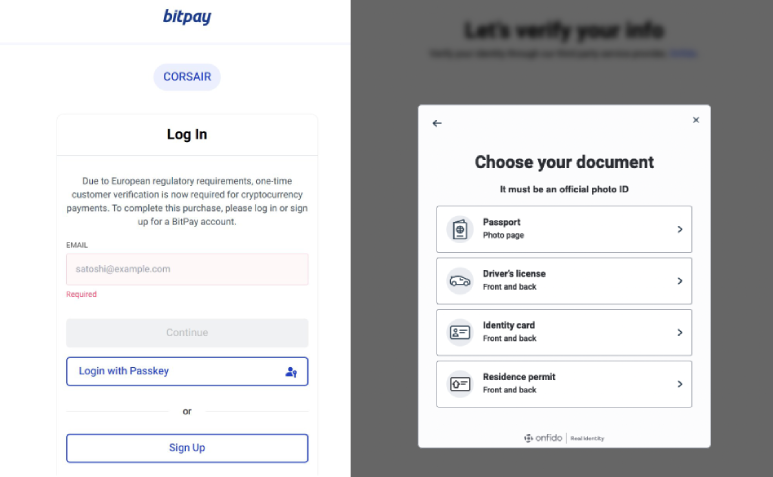
KYC May Be Requested from Customers
Cases:
https://x.com/etherbalance/status/1940373241073447198
https://x.com/hampus_s/status/1511797061926146057
https://x.com/morningeth/status/1642654548782096388
Unsupported Countries/Territories

Possible Freezing of user funds.
BitPay could hold funds and may require full KYC from your customers if a refund or failed payment needs processing. Here is a real user report where BitPay refused to return funds without identity verification: https://www.reddit.com/?rdt=33646
Summary
BitPay suits regulated businesses needing fiat settlement, but sacrifices privacy, UX, and crypto-native principles.
3. Coinbase Commerce
Website: https://coinbase.com
Type: Hybrid
KYC: Required
AML: Yes
Fee: ~1% + spreads
Checkout: External Coinbase-hosted checkout page
API: REST
Integrations: WooCommerce, Shopify, BigCommerce
Pros
- Strong Coinbase brand
- Easy initial setup
- Secure infrastructure
- Good documentation
Cons
- Limited token support
- External checkout flow (your clients will be redirected to the Coinbase checkout page)
- Strong dependency on the Coinbase ecosystem (customers can pay only with supported wallets)
- UX complaints from online-store buyers
- Plugin stability issues
User Experience & Challenges
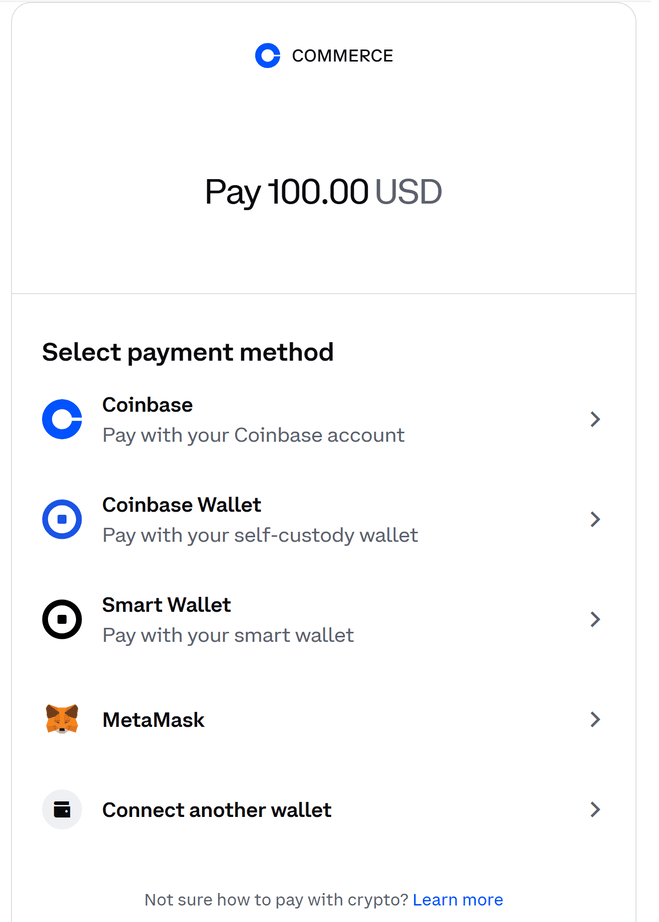
Coinbase Commerce relies on wallet connections and transaction signing through specific UX flows, requiring users to connect supported wallets, browser extensions, or interact via Coinbase-managed interfaces. This ties users to specific wallets and software, which creates payment difficulties. From our point of view, Coinbase strongly imposes its ecosystem, which affects payment flexibility and order processing, potentially impacting conversion. Some customers may refuse to pay due to additional setup steps or unfamiliar wallet connection requirements.
Summary
Coinbase Commerce is simple but restrictive and best suited for users already embedded in the Coinbase ecosystem.
4. NOWPayments
Website: https://nowpayments.io
Type: Claimed non-custodial
KYC: Not required at the initial stage
AML: Conditional
Fee: ~0.5–1%
Checkout: External hosted invoices
API: REST
Integrations: WooCommerce, Shopify, WHMCS
Service Pros
- Very large coin and token selection
- Flexible invoice system
- Low entry barrier
Service Cons
- Buyer redirection to an external checkout page
- Limited UX customization
- Short invoice expiration (around 15 minutes)
- Unknown costs for conversions and swaps
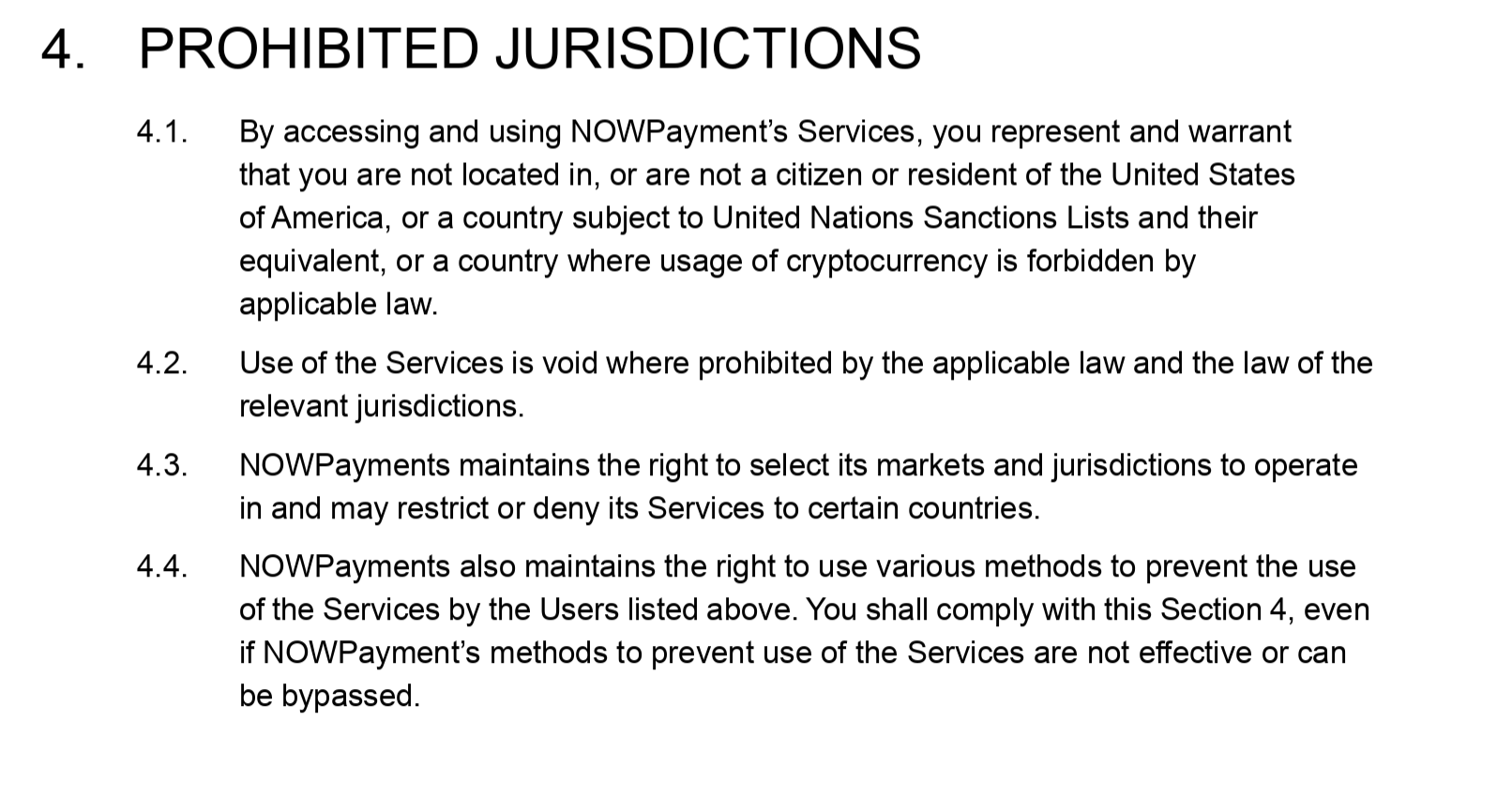
- Wide list of unsupported countries
User Experience & Challenges
Prohibited Jurisdictions
Possible temporary fund holds during KYC
Cases:
https://x.com/DacostaHosting/status/1892519698702422153
https://x.com/Bogdan267364/status/1980933065322144022
https://x.com/EB7/status/1768233529564160044
External Checkout Redirection
NOWPayments redirects users to third-party payment pages. Invoices expire quite quickly; many users do not have enough time to pay. The service receives funds into its accounts and stores them, even though it calls itself non-custodial. To receive your funds, you must withdraw them from the service balance.
Summary
OWPayments is flexible but still controls checkout UX and money flow.
5. CoinPayments
Website: https://coinpayments.net
Type: Hybrid custodial
KYC: Required for advanced features
AML: Yes
Fee: ~0.5–1%
Checkout: External CoinPayments checkout page
Integrations: WooCommerce, Shopify, POS
Pros
- Massive asset coverage
- Mobile and POS support
Cons
- Platform-controlled wallets
- KYC for higher limits (refer to documentation for exact limits)
- External checkout pages
- Complex fee structure
User Experience & Challenges
External Checkout Redirection
Like other custodial gateways, CoinPayments redirects users to branded payment pages. The most confusing aspect is the large number of different fees, including fees for deposits, withdrawals, receiving funds, and exchanges.
Summary
CoinPayments offers scale, but custody and compliance risks remain.
6. BTCPay Server
Website: https://btcpayserver.org
Type: True non-custodial (self-hosted)
KYC: No
AML: No
Fee: None (network fees only)
Checkout: Hosted invoice pages (default)
API: Open-source
Plugins: WooCommerce, Shopify, Magento
Pros
- Full private key control (you provide your wallets)
- No third-party custody
- No KYC or AML
- Open-source and free
- Strong Bitcoin and Lightning support
Cons
- Mostly Bitcoin-only
- Altcoins require complex setup
- High technical complexity
- Requires DevOps skills
- External invoice pages by default
User Experience & Challenges
Highly technical solution
BTCPay Server is a powerful but complex solution that requires technical expertise and ongoing infrastructure maintenance, including servers, nodes, Docker configuration, updates, and backups. Operational costs, node synchronization, monitoring, and security management must be handled by the merchant. For non-technical teams, this significantly increases setup and maintenance overhead.
Summary
BTCPay Server is ideal for technical Bitcoin-focused teams but unsuitable for most regular merchants.
How Bcon Works
Bcon is built on a pure P2P payment model:
Directly to your wallet model
You can connect any wallet, whether it’s MetaMask, Trust Wallet, Atomic Wallet, Electrum, or a crypto exchange wallet. You only need to provide the service with addresses, without access keys. These addresses will be included in the payment invoices.
Bcon never touches funds
You do not need to provide private keys to your wallets. Therefore, the service simply does not have access to your funds. This is precisely why the service cannot automatically convert your assets into stablecoins and hedge you against volatility. It does not have the technical capability to do so.
Only on-chain tracking
Bcon only tracks transactions but does not manage them. The service tracks transactions just as you would do manually through a block explorer. Bcon knows what amount and currency you are expecting for a specific invoice and monitors its status, providing you with information about it. Nothing more.
Payment status confirmation
The service tracks the required payment and notifies you via callback, sending data to your website. Based on this data, your system determines what to do.
Because funds never pass through Bcon
- No KYC for you or your customers
- No AML on transactions
- No blocked funds
Key Differences vs. Other Gateways
No Hosted Checkout Pages
The entire payment process takes place on your website, with the invoice generated and displayed directly on the checkout page. Ready-made integration plugins automatically adapt to the design of your website. And if you use the API, you can create something unique.
Direct Wallet Payments
The wallet addresses you specified in Bcon will be indicated in the generated invoices, and your customers will pay you directly, just as they would pay you in cash on the street. Bcon has no access to your funds and cannot do anything except track the payment status.
Commission Model
You pay the commission separately by topping up your balance on the service, and the commission is deducted from this balance. Since Bcon does not have private keys, it cannot deduct the commission from your transaction itself. It only bills you for the amount you owe it.
Simplicity for Everyone
All you need to register is an email address and to specify the wallets where you want to receive payments. And there are no requirements for your users at all. You see the wallet and the amount—pay.
Tech Features
API Capabilities
- Invoice creation (tracking a wallet for a specific amount)
- On-chain payment tracking
- Webhooks (callbacks with status updates)
- Custom checkout logic
Plugins & Integrations (All Free)
- WordPress / WooCommerce
- OpenCart
- WHMCS
- Shopify
All integrations are free, design-adaptive, and easy to use.
Why Bcon Is Different
Supported Blockchains
- Bitcoin (BTC)
- Ethereum (ETH)
- Binance Smart Chain (BNB)
- Solana (SOL)
- Tron (TRX)
Main Features Comparison
| Feature | Bcon | Most Gateways |
| Custody | ❌ No | ✅ Yes |
| KYC / AML | ❌ No | ✅ Yes |
| P2P payments | ✅ Yes | ❌ No |
| Checkout redirection | ❌ No | ✅ Yes |
| Free plugins | ✅ Yes | ❌ Often paid |
| UX control | Merchant | Gateway |
User Experience & Payment Flow Comparison
| Gateway | External Checkout / Redirection | User stays on merchant site | Checkout UX controlled by gateway | Wallet dependencies / Ecosystem lock-in | Key UX Challenges |
|---|---|---|---|---|---|
| Bcon | ❌ No | ✅ Yes | ❌ No | ❌ None | Smooth, fully native checkout; merchants manage their own wallets; minimal friction |
| BitPay | ✅ Yes | ❌ No | ✅ Yes | ⚠️ Partial (depends on BitPay interfaces) | Buyers redirected off-site; UX controlled by BitPay; KYC may be triggered for refunds; checkout flexibility limited |
| Coinbase Commerce | ✅ Yes | ❌ No | ✅ Yes | ✅ Strong (requires supported wallet connections / signing) | Users must connect wallets, sign transactions via Coinbase UX; ecosystem lock-in; higher friction for non-Coinbase users |
| NOWPayments | ✅ Yes | ❌ No | ✅ Yes | ❌ Minimal | Hosted invoice pages; users must select network and complete payments externally; short invoice expiry; checkout flow not fully on merchant site |
| CoinPayments | ✅ Yes | ❌ No | ✅ Yes | ⚠️ Partial (encouraged to use CoinPayments wallet in some flows) | Platform-managed checkout; limited customization; users interact outside merchant site; possible confusion for customers |
| BTCPay Server | ✅ Default (can be self-hosted) | ⚠️ Optional (if self-hosted) | ⚠️ Optional (if self-hosted) | ❌ None (self-hosted) | Technical setup required; merchants must manage servers, nodes, Docker, backups; default hosted invoice pages redirect users unless customized |
Final Conclusion
In 2026, crypto payment gateways fall into three categories:
- Custodial and regulated — safe but restrictive
- Claimed non-custodial — flexible but misleading
- True non-custodial P2P — rare but ideal
Most gateways still control your checkout UX, route funds internally, and enforce KYC and AML.
Bcon represents a different approach with key features:
- No custody
- No redirection
- No compliance friction
- Direct wallet-to-wallet payments
Bcon is for merchants who value control, privacy, simplicity, and independence for online payments and are looking for the best cryptocurrency payment gateway.