
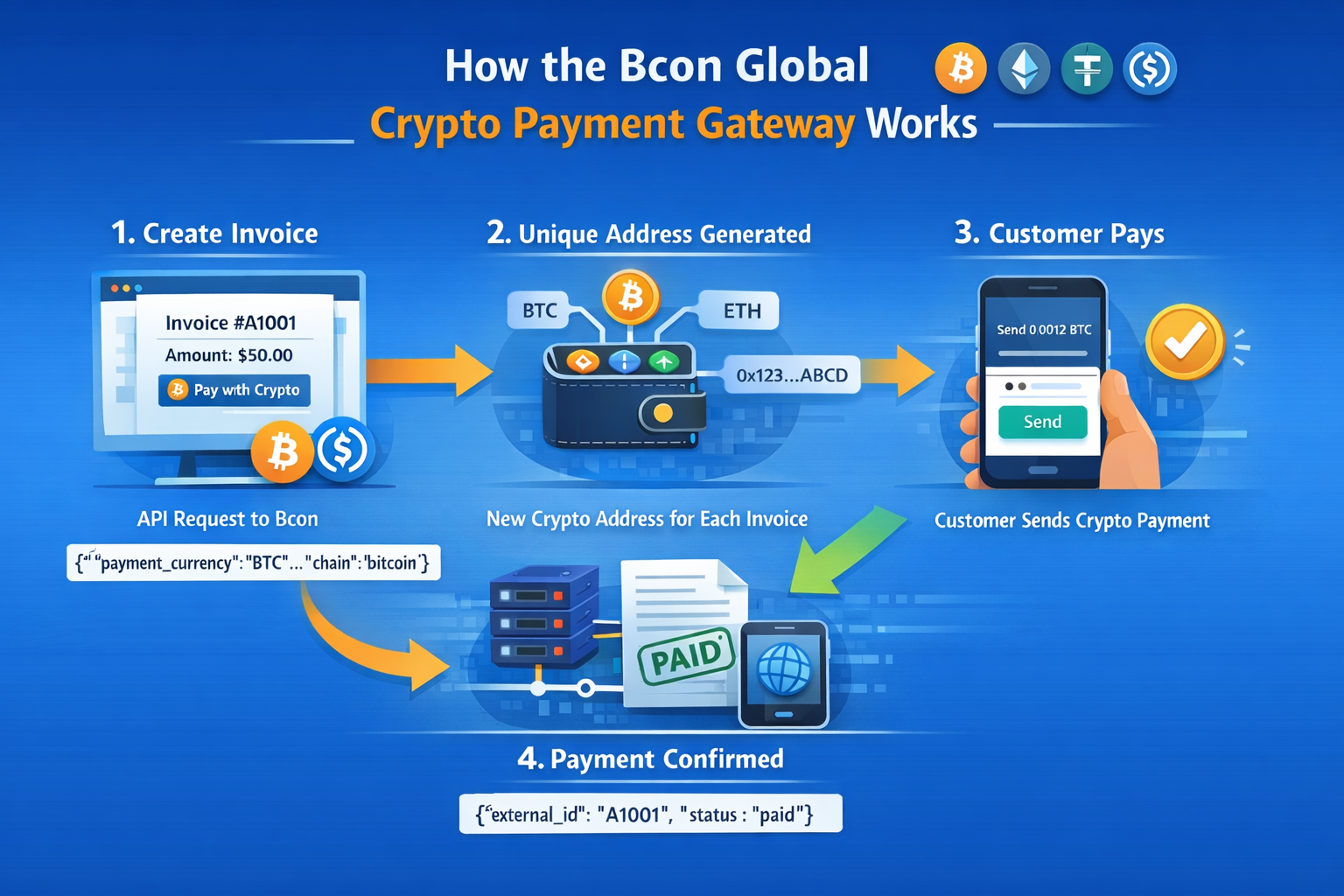








Accepting cryptocurrency on your website may sound complicated. But with a payment gateway like Bcon, the process becomes structured and predictable.
In this article, you will learn:
- How the gateway works
- How payments are identified
- What you need before connecting your website
- How the New Address API function works
- How to correctly use all parameters
- The difference between BTC and EVM chains
- How invoice expiration works
How the Bcon Crypto Payment Gateway Works
Before writing code, you must understand the logic.
A crypto payment gateway does 4 main things:
- Creates a unique payment address for an invoice
- Monitors the blockchain
- Detects incoming transactions
- Sends a callback (notification) to your website
When a customer places an order:
- Your website creates an invoice via API
- The gateway generates a crypto address
- The customer sends crypto to that address
- The gateway detects the payment
- The gateway sends a callback to your server
- You mark the order as paid
That’s it.
2. What You Need Before Connecting
To connect your website to Bcon, you need:
A wallet to receive funds
This is YOUR wallet.
This is where you want to receive crypto.
The setup depends on blockchain type:
- For Bitcoin → you provide an xpub
- For EVM chains (Ethereum, BSC, Tron) → you provide a regular wallet address
We will explain the difference below.
A Callback URL
This is a URL on your server.
Example:
https://yourstore.com/callback.phpWhen payment status changes, Bcon will send a POST request to this URL.
Without callback, your website will not know that payment happened.
API Key
For each blockchain store created in Bcon panel, you receive a separate API key.
Important:
- Bitcoin → its own API key
- Ethereum → its own API key
- Binance → its own API key
- Tron → its own API key
You must send it in header:
Authorization: Bearer YOUR_API_KEY
3. Bitcoin vs EVM Chains – Important Difference
This is VERY important for understanding how payments are identified.
Bitcoin (BTC)
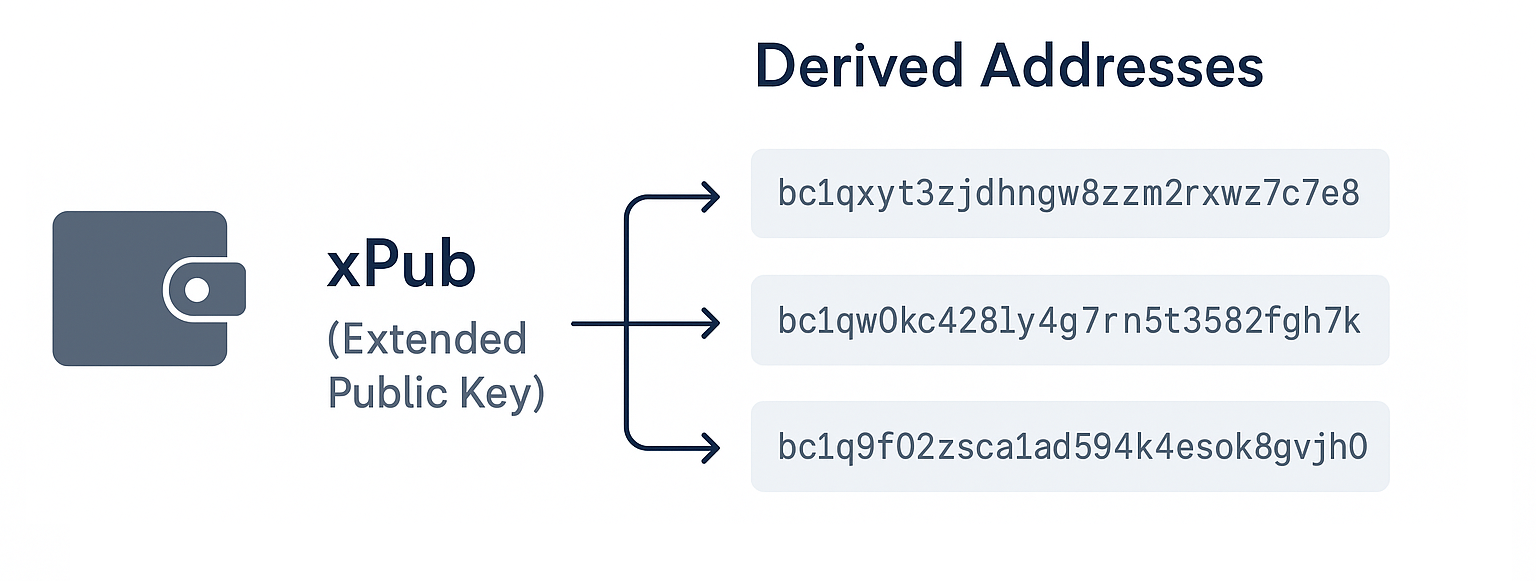
Bitcoin uses xpub (extended public key).
Important:
- xpub does NOT give access to funds
- It can only generate addresses
- It is safe to give to gateway
How it works:
For every invoice:
- Bcon generates a NEW BTC address from your xpub
- Each invoice has its own unique address
Example:
Invoice 1 → Address A
Invoice 2 → Address B
Invoice 3 → Address C
This makes identification VERY easy.
If 0.005 BTC arrives to Address B →
System knows → this is Invoice 2.
Ethereum, BSC, Tron (EVM chains)
EVM chains do NOT use xpub.
You provide:
One wallet address
Example:
0x1234abcd….
Now problem:
If two customers pay at same time:
Invoice A → $50
Invoice B → $50
Both pay to SAME wallet.
How system knows which invoice is paid?
It cannot know by sender (blockchain does not identify customer).
So Bcon solves it like this:
Invoice A → $50.00
Invoice B → $50.01
System adds 1 cent to second invoice. Customer MUST pay exact amount. If customer sends wrong amount → system cannot identify invoice.
Important Rule for EVM
Customer must send EXACT amount.
Example:
Invoice says:
50.01 USDT
Customer sends:
50.00 USDT
System will NOT match invoice.
What Happens After Invoice Expires?
Each invoice has payment time limit.
If:
- Payment not received → invoice expires
- Payment successful → invoice closes
After invoice closes:
New invoices for $50 will again be created as $50.00
No extra cent needed anymore.
Tracking stops after expiration or success.
4. Using the “New Address” API
Endpoint:
POST https://external-api.bcon.global/api/v2/addressExample in PHP:
define("BCON_APIKEY", "YOUR_API_KEY");

$curl = curl_init();
curl_setopt_array($curl, array(
 CURLOPT_URL => 'https://external-api.bcon.global/api/v2/address',
 CURLOPT_RETURNTRANSFER => true,
 CURLOPT_CUSTOMREQUEST => 'POST',
 CURLOPT_HTTPHEADER => array(
   'Accept: application/json',
   'Content-Type: application/json',
   'Authorization: Bearer '.BCON_APIKEY
 ),
 CURLOPT_POSTFIELDS => json_encode([
   "payment_currency" => "USDC",
   "origin_amount" => "15",
   "origin_currency" => "USD",
   "external_id" => "A1001",
   "chain" => "ethereum"
 ]),
));

$response = curl_exec($curl);
curl_close($curl);
echo $response;
5. Understanding All Parameters
Let’s explain everything clearly.
Required Parameters
1. payment_currency
Token ticker.
Examples:
BTC
USDT
USDC
This defines what customer will pay in.
2. origin_amount
Amount in fiat currency.
Example: 15
3. origin_currency
Fiat currency code.
Examples:
- USD
- EUR
- UAH
If your product price is $15:
origin_currency = USD
origin_amount = 15
System converts automatically to token amount.
Example result:
0.00032 BTC
Automatic Conversion Logic
If you use:
- payment_currency
- origin_amount
- origin_currency
System calculates crypto amount based on market rate.
Optional Parameters
payment_amount
This overrides conversion.
Use it when:
- You want exact crypto amount
- You do not want auto conversion
Example:
“payment_currency” => “BTC”,
“payment_amount” => “0.01”
Now origin_amount is ignored. Invoice will be EXACTLY 0.01 BTC.
external_id
Very important. This is your invoice number.
Example:
“external_id” => “A1001”
Rules:
- Must be unique per store
- Max length 8 characters
- Returned in callback
When callback arrives:
Instead of searching by amount, you search by external_id.
chain
Defines blockchain.
Available:
- bitcoin
- ethereum
- binance
- solana
- tron
Example:
“chain” => “bitcoin”
Must match payment_currency.
6. Practical Examples
Example 1 – Auto Conversion (USD → BTC)
You sell product for $100.
"payment_currency" => "BTC",
"origin_amount" => "100",
"origin_currency" => "USD",
"external_id" => "B2001",
"chain" => "bitcoin"
System calculates:
0.0021 BTC
Customer pays BTC.
Example 2 – Fixed Crypto Amount
You want fixed 50 USDT.
"payment_currency" => "USDT",
"payment_amount" => "50",
"external_id" => "C3001",
"chain" => "tron"
No conversion used.
Example 3 – Two EVM Invoices Same Amount
Two invoices:
50 USD
50 USD
System may generate:
Invoice 1 → 50.00 USDT
Invoice 2 → 50.01 USDT
Customer must send exact value.
7. How Callback Works
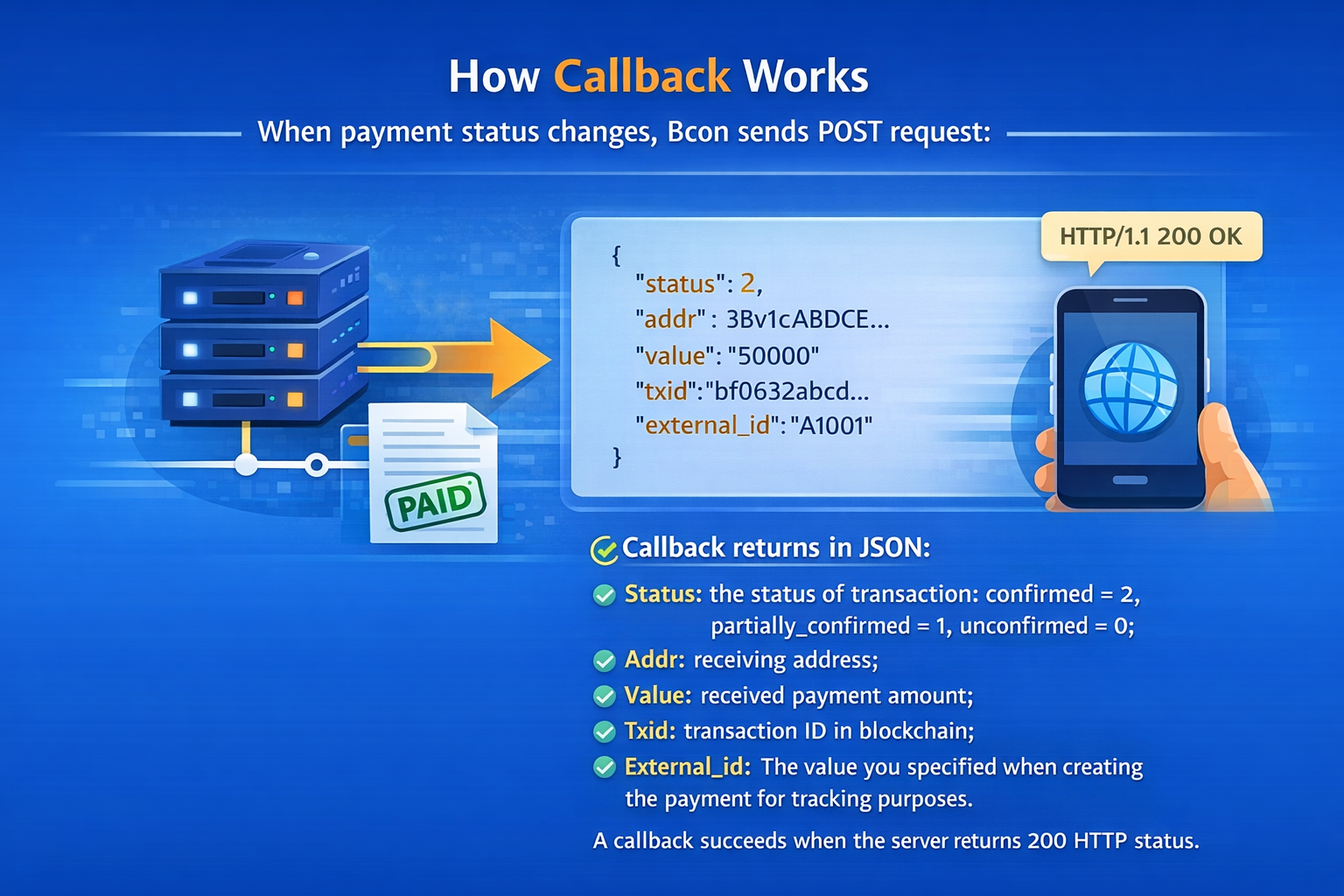
When the payment status changes, the Bcon system sends a POST request to your callback URL.
This request contains important information about the transaction. Your server must read this data and update the order status in your database.
The callback will return the following fields:
- Status — the transaction status
- confirmed = 2
- partially_confirmed = 1
- unconfirmed = 0
- confirmed = 2
- Addr — the receiving address where the payment was sent
- Value — the received payment amount
- Txid — the transaction ID in the blockchain
External_id — the value you specified when creating the invoice (used for tracking)
Example Callback JSON
{
 "status": 2,
 "addr": "0x1234abcd...",
 "value": "15000000",
 "txid": "0x98fa76bc54...",
 "external_id": "A1001"
}
What the Status Means
- 0 (unconfirmed) → Transaction detected but not confirmed yet
- 1 (partially_confirmed) → Transaction has some confirmations
- 2 (confirmed) → Transaction is fully confirmed and payment is final
In most cases, you should mark the order as paid only when status = 2.
Important Technical Notes
1️⃣ Callback Success Rule
A callback is considered successful only when your server returns:
HTTP 200 status
If your server does not return HTTP 200, the system may retry sending the callback.
2️⃣ BTC Balance Units
For Bitcoin payments:
- The Value field is returned in satoshis, not BTC.
Reminder:
1 BTC = 100,000,000 satoshis
Example:
If Value = 50000000
That means:
0.5 BTC
For EVM chains (Ethereum, BSC, Tron), the value follows the blockchain’s native smallest unit rules.
Simple PHP Example to Handle Callback
$data = json_decode(file_get_contents("php://input"), true);
$status = $data['status'];
$external_id = $data['external_id'];
if ($status == 2) {
   // Mark order as paid in database
}
8. Best Practices
✔ Always use external_id
✔ Always verify callback
✔ Always require exact payment
✔ Always use separate API key per chain
✔ Do not expose private keys
✔ For BTC – use xpub only
9. Summary
Using the New Address function from Bcon allows you to:
- Automatically generate payment addresses
- Automatically calculate crypto amounts
- Automatically track payments
- Automatically receive callbacks
Key differences:
Bitcoin:
- Uses xpub
- Generates unique address per invoice
- Perfect identification
EVM:
- One wallet address
- Amount differentiation used
- Exact payment required
If you understand:
- origin_amount
- origin_currency
- payment_currency
- payment_amount
- external_id
- chain
Then you fully control invoice creation logic.