








Bcon: Store setup & settings tutorial
Option 1 — Single Wallet Payment Detection
Overview
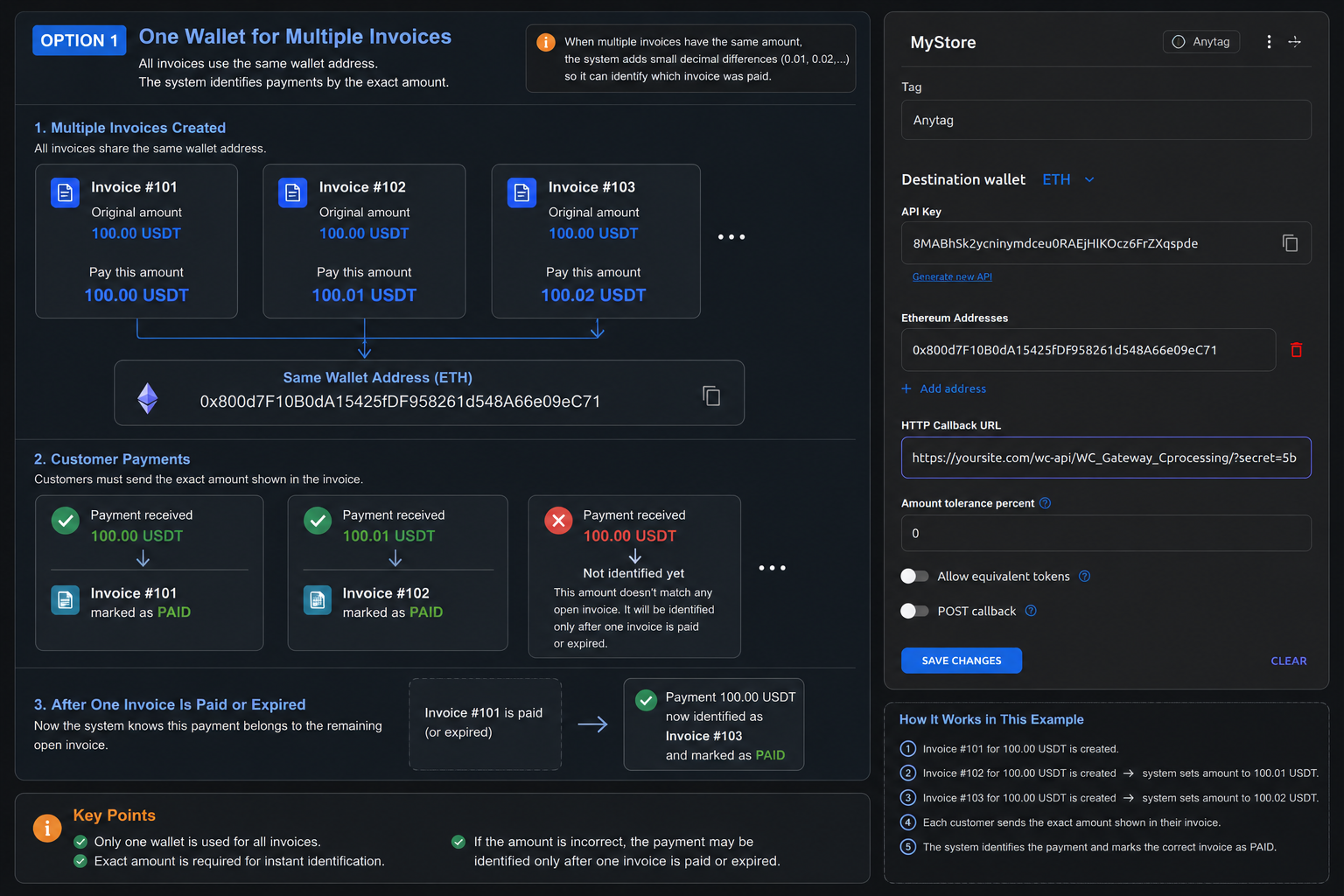
In Single Wallet Mode, all invoices use the same cryptocurrency address for receiving payments.
This is the simplest configuration method and requires only one wallet address to start accepting payments.
How Invoice Identification Works
Because all customers pay to the same address, the system must identify invoices by the payment amount.
Example:
| Invoice | Wallet | Amount |
| #101 | Wallet A | 100 USDT |
| #102 | Wallet A | 100 USDT |
If both invoices have the same amount and use the same wallet, an incoming payment of 100 USDT cannot be matched to a specific invoice.
Automatic Amount Differentiation
To avoid conflicts, the gateway automatically adds small decimal variations to new invoices with duplicate amounts.
Example:
| Invoice | Final Payment Amount |
| #101 | 100.00 USDT |
| #102 | 100.01 USDT |
| #103 | 100.02 USDT |
This allows the system to determine which invoice was paid based on the exact received amount.
Important Notes
For instant automatic identification, the customer must send the exact amount displayed in the invoice.
If the payment amount is:
- lower than expected,
- higher than expected,
- rounded by the sender,
- or modified by an exchange,
the system may not immediately identify the payment.
In some cases, identification becomes possible only after another invoice using the same wallet is completed or expires.
Advantages
- Very easy to configure
- Requires only one wallet address
- Suitable for small stores or low transaction volume
- Simple maintenance
Limitations
- Higher risk of payment identification conflicts
- Exact payment amount is critical
- Less reliable for large numbers of simultaneous invoices
- More sensitive to exchange fees and third-party payment processors
Recommended Use Cases
Single Wallet Mode is recommended when:
- you process a small number of payments;
- invoices usually have different amounts;
- you want the fastest and simplest setup;
- your customers typically send exact amounts.
Option 2 — Multiple Wallet Payment Detection (Recommended)
Overview
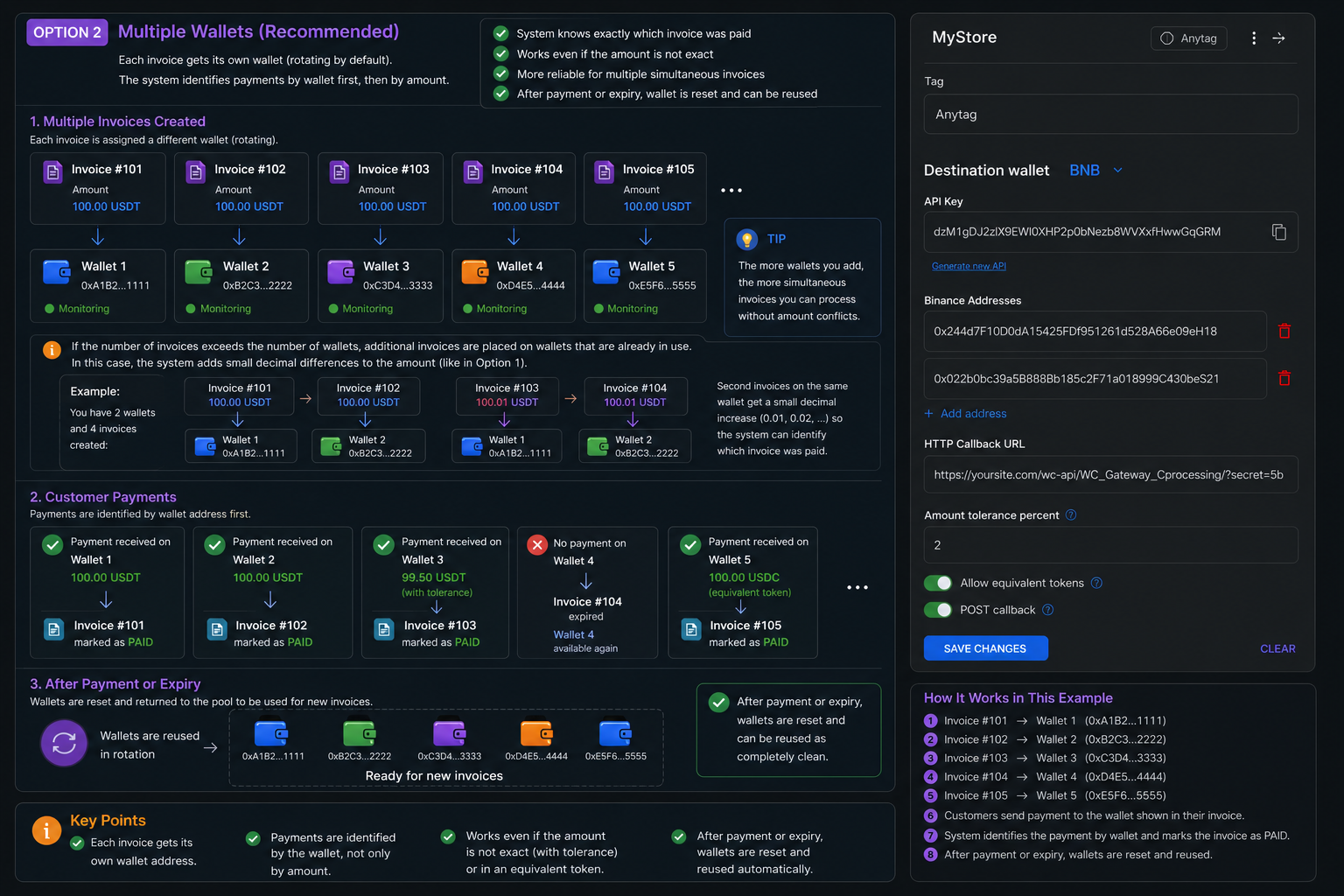
In Multiple Wallet Mode, the system rotates between several wallet addresses instead of using only one.
Each new invoice is assigned to the next available wallet from the configured wallet pool.
This significantly improves payment identification accuracy and reduces invoice conflicts.
How Wallet Rotation Works
Example wallet pool:
- Wallet 1
- Wallet 2
- Wallet 3
- Wallet 4
- Wallet 5
If five invoices are created simultaneously:
| Invoice | Assigned Wallet |
| #101 | Wallet 1 |
| #102 | Wallet 2 |
| #103 | Wallet 3 |
| #104 | Wallet 4 |
| #105 | Wallet 5 |
The system primarily identifies payments by wallet address rather than only by amount.
Why Multiple Wallets Improve Reliability
Even if the customer sends:
- a slightly incorrect amount,
- a payment through an exchange,
- or a modified transaction value,
the system still knows which invoice belongs to which wallet.
This greatly reduces the chance of unidentified payments.
Wallet Reuse Logic
After:
- a successful payment,
- or invoice expiration,
the wallet is automatically removed from monitoring and returned back to the available wallet pool.
The same address can then be reused for future invoices.
What Happens When All Wallets Are Occupied
If the number of active invoices exceeds the number of configured wallets, the system starts assigning additional invoices to already-used wallets.
Example:
- 5 wallets configured
- 20 simultaneous invoices created
Once all wallets are busy, the system automatically enables decimal amount differentiation for invoices sharing the same address.
Example:
| Wallet | Invoice | Amount |
| Wallet 1 | #101 | 100.00 USDT |
| Wallet 1 | #106 | 100.01 USDT |
This creates a hybrid identification model:
- wallet address identification;
- exact amount identification when needed.
Advantages
- More reliable payment detection
- Better support for simultaneous invoices
- Reduced invoice conflicts
- Works better with third-party payment services
- Compatible with Amount Tolerance and Equivalent Token Detection
- Scales more efficiently for high-traffic stores
Limitations
- Requires multiple wallet addresses
- Slightly more complex setup
- Very large invoice volumes may still trigger decimal differentiation
Recommended Use Cases
Multiple Wallet Mode is recommended when:
- your store processes many simultaneous payments;
- invoice amounts are often identical;
- automatic payment processing is important;
- you want to reduce unidentified transactions;
- customers frequently pay through exchanges or external services.
Quick Comparison
| Feature | Single Wallet | Multiple Wallets |
| Setup simplicity | Very simple | Moderate |
| Wallet count | 1 | Multiple |
| Invoice identification | By amount only | By wallet + amount |
| Simultaneous invoices | Limited | Much better |
| Exact amount required | Usually yes | Less critical |
| Scalability | Lower | Higher |
| Recommended for production | Limited | Yes |